
- Getting Started
- Industry
- Training
- Features
- Effects
-
Plugins
- AG Core
- AstuteBuddy
- Autosaviour
- ColliderScribe
- DirectPrefs
- DynamicSketch
- FindReplace
- InkFlow
- InkQuest
- InkScribe
- MirrorMe
- Phantasm
- Randomino
- Rasterino
- Reform
- Stipplism
- Stylism
-
SubScribe
- Getting Started
- Circle by Points Tool
- Tangent Circle Tool
- Curvature Circle Tool
- Arc by Points Tool
- Tangent Line Tool
- Perpendicular Line Tool
- Connect Tool
- Straighten Tool
- Lock Unlock Tool
- Orient Tool
- Quick Orient Tool
- Orient Transform Tool
- AG Layer Comps Panel
- Art Switcher Panel
- Gradiator Panel
- Gradient Forge Panel
- AG Color Select Tool
- Color Stamp
- Gradient From Art
- Pixels to Vector
- QuickOps
- Texturino
- VectorFirstAid
- VectorScribe
- WidthScribe
- Scripts
- FAQs
- Updates
- Team Licensing
- Reseller Licensing
- Astute Manager
 Retract Handles Live Effect
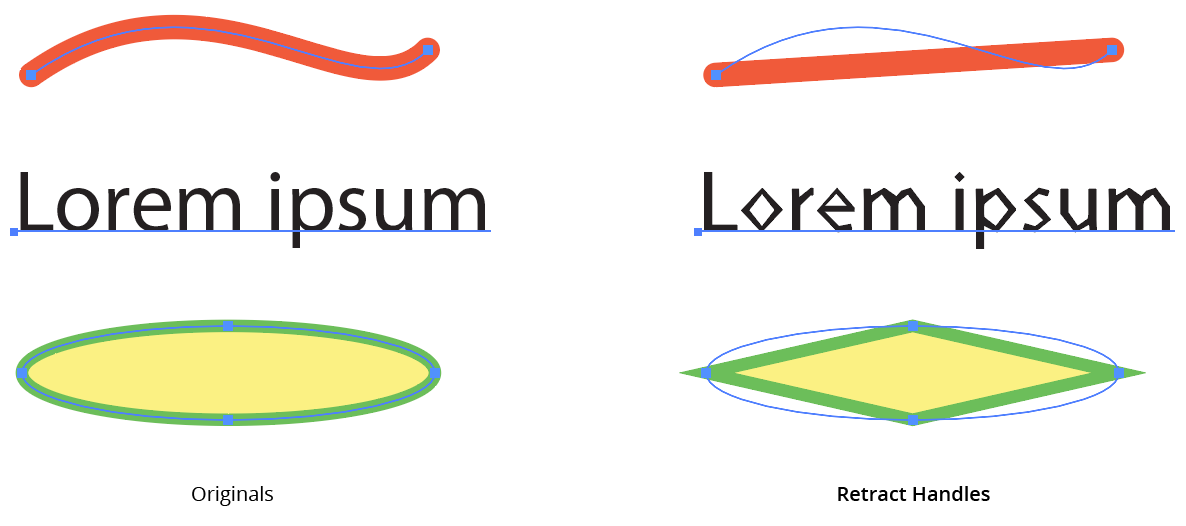
Retract Handles is an Astute Graphics live effect with one simple function: to retract (remove) the handles of the anchor points in the original art’s paths. An option allows only handles that are shorter than a specified amount to be retracted.
As with most live effects, Retract Handles appears in the main menu, under Effect > AG Utilities. It can also be applied directly from the Appearance panel using the “Add New Effect” button at the bottom of the panel.
Retract Handles Parameters Dialog
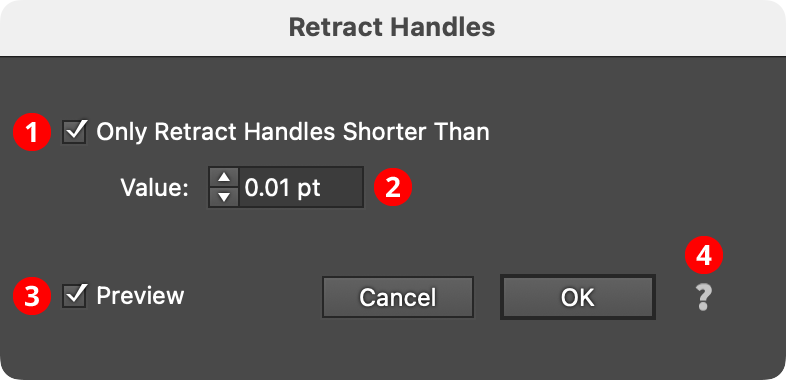
After applying the live effect using the menu item (or when clicking on the existing effect in the Appearance panel to edit it), the parameters dialog will appear:
Retract Handles Parameters Dialog
1. Only Retract Handles Shorter Than
When enabled, only the handles in the artwork which are shorter than the specified value are retracted. This can be useful for removing very tiny handles that are generated by a previous live effect in the Appearance stack, such as an Outline Path or PathFinder effect, from keeping subsequent effects, such as AG Corners, from working properly.
2. Value
The length value above which handles will be preserved.
When its Only Retract Handles Shorter Than preference is turned off (the default), the Retract Handles effect ensures that all segments in the paths to which it is applied become straight:
AG Utilities Live Effects - Retract Handles Live Effect
