
- Getting Started
- Industry Workflows
- Training
- Features
- Effects
-
Plugins
- AG Core
- AstuteBuddy
- Autosaviour
- ColliderScribe
- DirectPrefs
- DynamicSketch
- FindReplace
- InkFlow
- InkQuest
- InkScribe
- MirrorMe
- Phantasm
- Randomino
- Rasterino
- Reform
- Stipplism
- Stylism
-
SubScribe
- Getting Started
- Circle by Points Tool
- Tangent Circle Tool
- Curvature Circle Tool
- Arc by Points Tool
- Tangent Line Tool
- Perpendicular Line Tool
- Connect Tool
- Straighten Tool
- Lock Unlock Tool
- Orient Tool
- Quick Orient Tool
- Orient Transform Tool
- AG Layer Comps Panel
- Art Switcher Panel
- Gradiator Panel
- Gradient Forge Panel
- AG Color Select Tool
- Color Stamp
- Gradient From Art
- Pixels to Vector
- QuickOps
- Texturino
- VectorFirstAid
- VectorScribe
- WidthScribe
- Scripts
- FAQs
- Updates
- Team Licensing
- Reseller Licensing
- Astute Manager
5. Projects
To organize and share your Adobe Illustrator resources and creative project files with your Teams, go to:
5 Projects
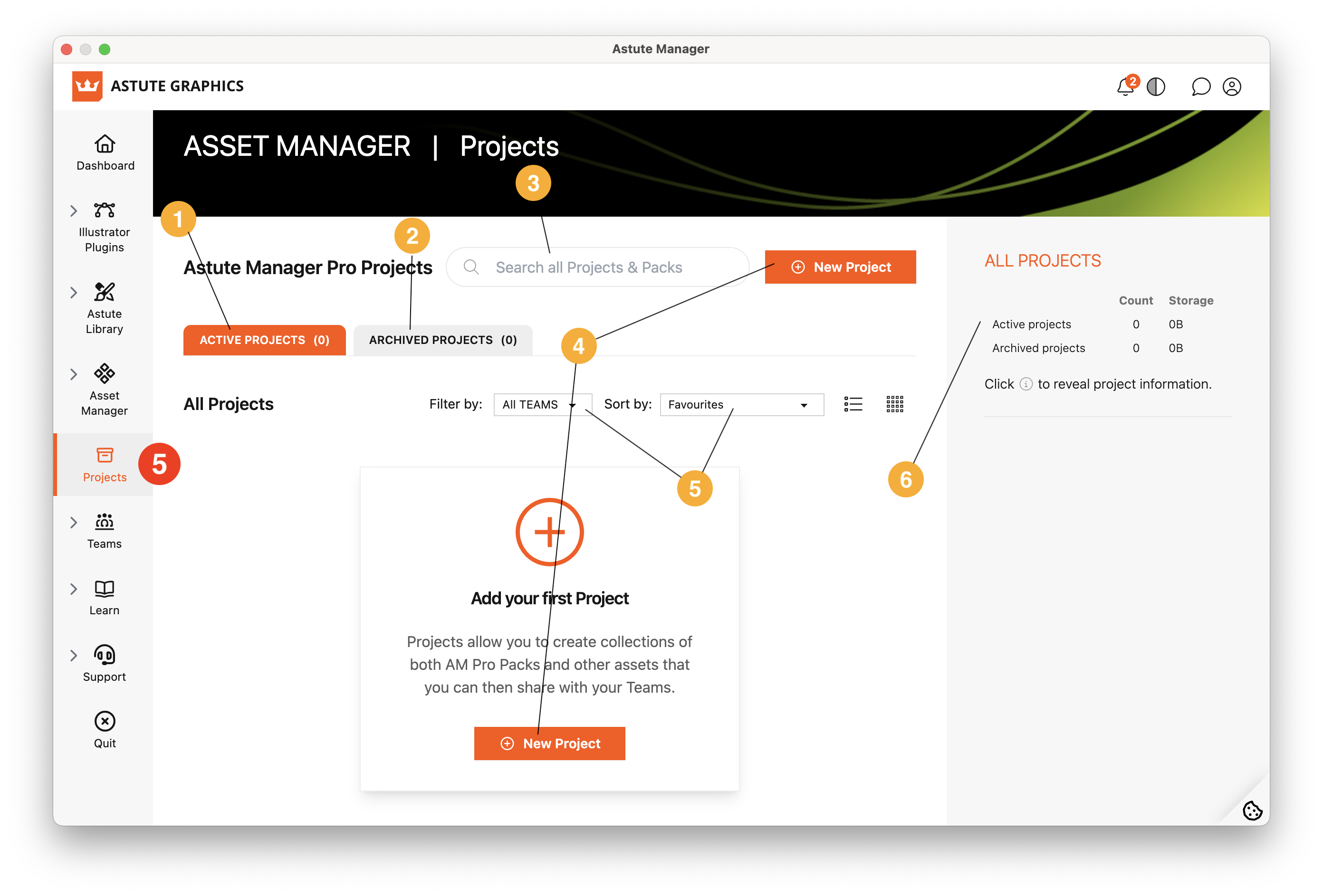
Astute Manager - Projects
Active Projects
Archived Projects
Search Projects
Click to begin a new project
Filter options
Projects info
Projects brings artwork, brushes, swatches, workspaces, and supporting documents into shared collections, helping your team access the resources they need and install them to the appropriate locations.
See Introducing Projects to Astute Manager Pro.