
- Getting Started
- Industry Workflows
- Training
- Features
- Effects
-
Plugins
- AG Core
- AstuteBuddy
- Autosaviour
- ColliderScribe
- DirectPrefs
- DynamicSketch
- FindReplace
- InkFlow
- InkQuest
- InkScribe
- MirrorMe
- Phantasm
- Randomino
- Rasterino
- Reform
- Stipplism
- Stylism
-
SubScribe
- Getting Started
- Circle by Points Tool
- Tangent Circle Tool
- Curvature Circle Tool
- Arc by Points Tool
- Tangent Line Tool
- Perpendicular Line Tool
- Connect Tool
- Straighten Tool
- Lock Unlock Tool
- Orient Tool
- Quick Orient Tool
- Orient Transform Tool
- AG Layer Comps Panel
- Art Switcher Panel
- Gradiator Panel
- Gradient Forge Panel
- AG Color Select Tool
- Color Stamp
- Gradient From Art
- Pixels to Vector
- QuickOps
- Texturino
- VectorFirstAid
- VectorScribe
- WidthScribe
- Scripts
- FAQs
- Updates
- Team Licensing
- Reseller Licensing
- Astute Manager
Industry Educator Series
How to watch the industry-led workflow series in Astute Manager
The Astute Graphics Educator Series brings together industry-led workflow training from professional designers working across illustration, surface design, animation, branding, graphic design, and more.
Each series is made up of short, focused videos that show how Astute Graphics tools fit into real Adobe Illustrator workflows. You can watch the videos directly inside Astute Manager and download the accompanying work files where available.
Before you start
Create a free Astute Graphics account, then download and log in to Astute Manager.
Once signed in, you can access the Educator Series from the Learn section.
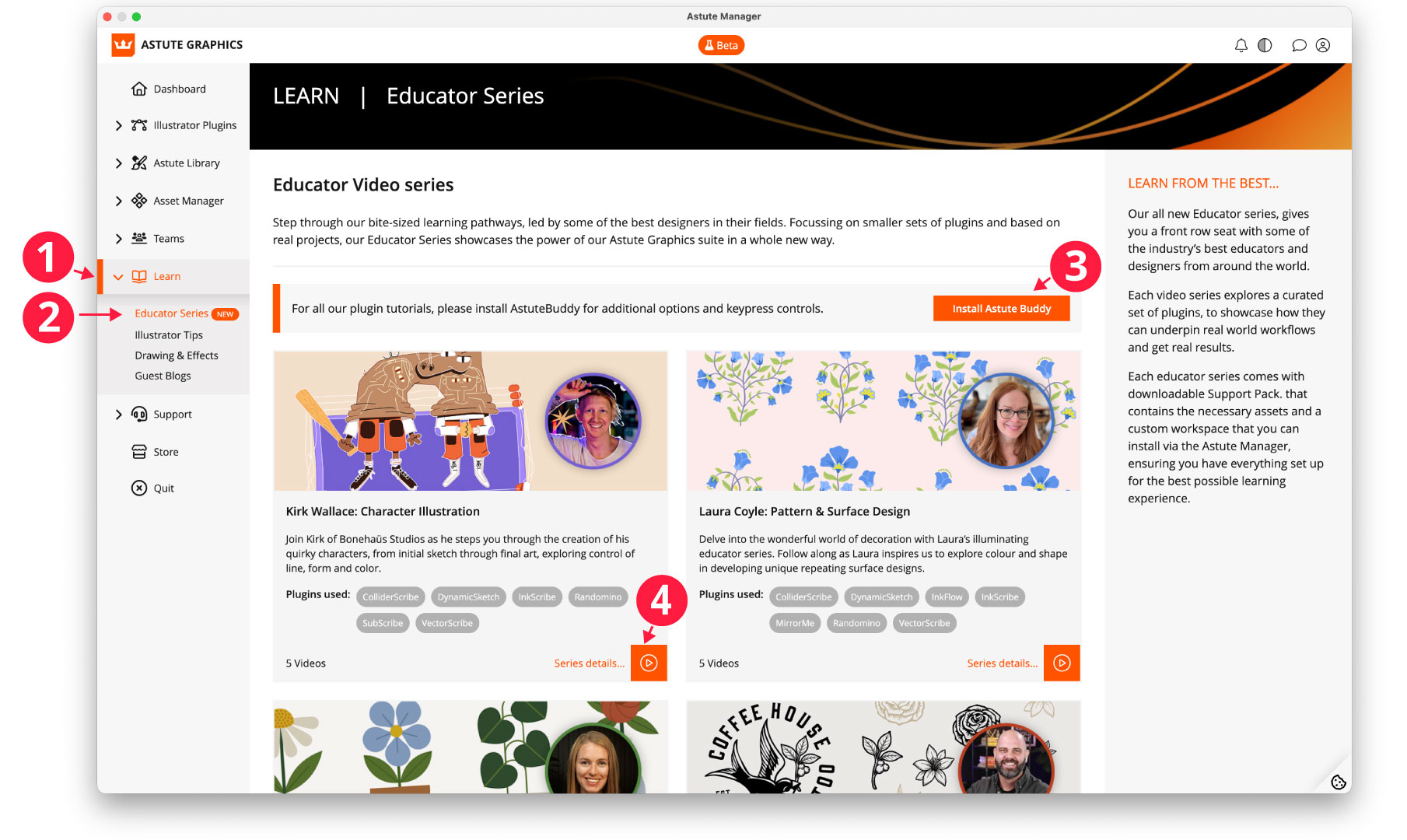
Locating the Educator Packs in Astute Manager
1. Open Learn
From the main Astute Manager navigation, select Learn.
This opens the learning area where you can access the Educator Series alongside other Illustrator training and resources.
2. Open Educator Series
Under Learn, select Educator Series.
Here you will see all currently available industry-led workflow series. Each course card includes the trainer, industry, plugins used, and number of videos in the series.
3. Optional: Install AstuteBuddy
Before starting a course, you can install AstuteBuddy from the Educator Series page.
AstuteBuddy provides additional on-screen information, options, and keypress controls while you work with Astute Graphics tools in Adobe Illustrator.
4. Choose your trainer and start the course
Each Educator Series focuses on a particular creative workflow and is led by a professional working in that field. Choose the trainer or workflow you want to explore, then open the series to access all of its videos.
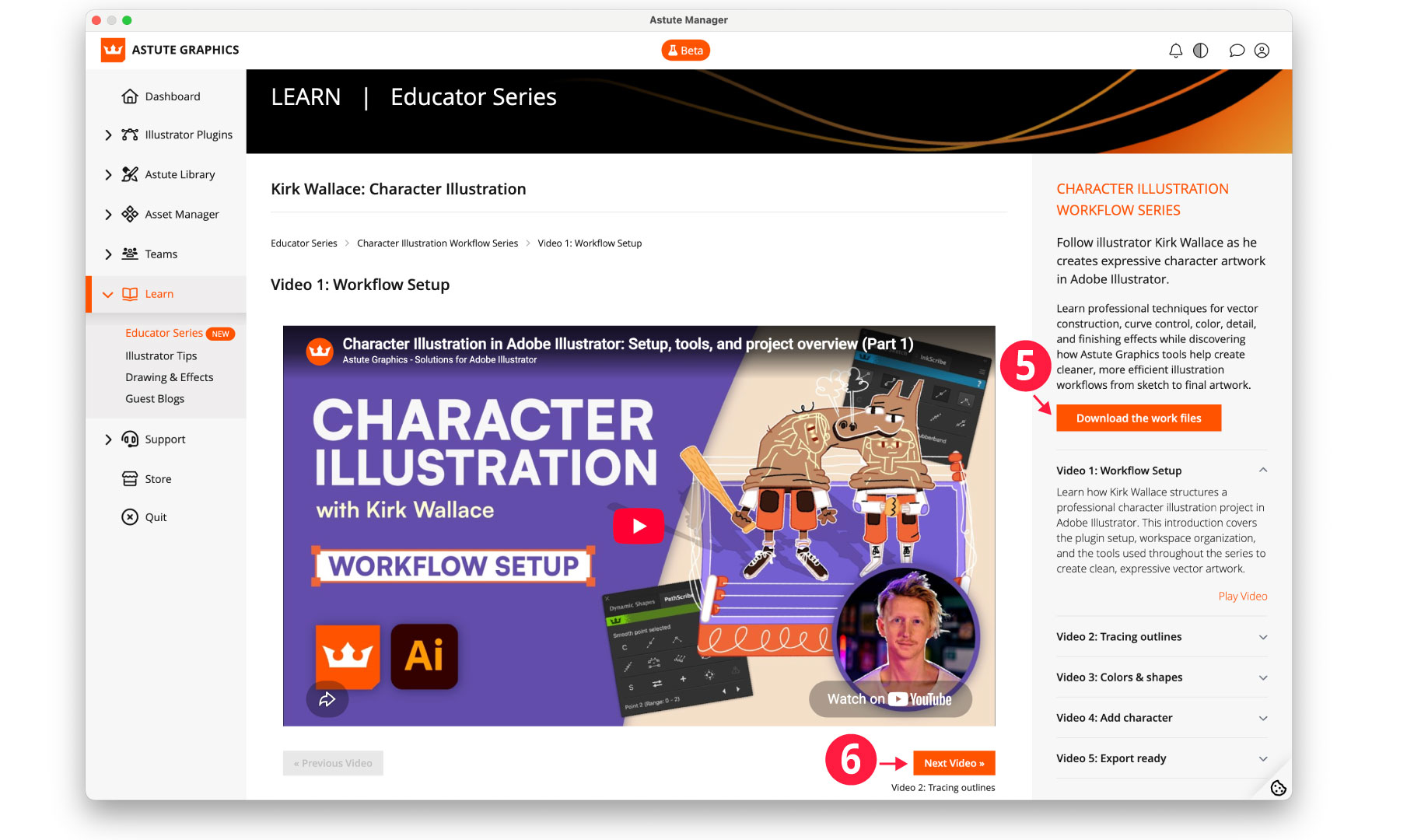
Watch the full series directly in Astute Manager
5. Download the work files
Select Download the work files to download the supporting assets for the course.
Where a custom workspace is included, you can also install it through Astute Manager on the Astute Library > Workspaces page, so your Illustrator setup more closely matches the trainer's working environment.
Watch the videos inside Astute Manager
You do not need to leave Astute Manager to follow the course.
Select a video from the series and it will play directly within the Educator Series page. Each lesson is designed to focus on a particular stage of the workflow, so you can follow the whole project from start to finish or return to specific techniques later.
The course page includes:
The complete workflow series
A short description of each lesson
The video currently being watched
Links to the remaining videos in the series
Downloadable course files where supplied
6. Move on to the next lesson
When you reach the end of a video, select Next Video to continue through the series.
You can also choose any lesson directly from the course list at the side of the page.
This makes it easy to work through the complete workflow at your own pace while keeping the videos, work files, and Astute Graphics tools together inside Astute Manager.