
- Getting Started
- Industry Workflows
- Training
- Features
- Effects
-
Plugins
- AG Core
- AstuteBuddy
- Autosaviour
- ColliderScribe
- DirectPrefs
- DynamicSketch
- FindReplace
- InkFlow
- InkQuest
- InkScribe
- MirrorMe
- Phantasm
- Randomino
- Rasterino
- Reform
- Stipplism
- Stylism
-
SubScribe
- Getting Started
- Circle by Points Tool
- Tangent Circle Tool
- Curvature Circle Tool
- Arc by Points Tool
- Tangent Line Tool
- Perpendicular Line Tool
- Connect Tool
- Straighten Tool
- Lock Unlock Tool
- Orient Tool
- Quick Orient Tool
- Orient Transform Tool
- AG Layer Comps Panel
- Art Switcher Panel
- Gradiator Panel
- Gradient Forge Panel
- AG Color Select Tool
- Color Stamp
- Gradient From Art
- Pixels to Vector
- QuickOps
- Texturino
- VectorFirstAid
- VectorScribe
- WidthScribe
- Scripts
- FAQs
- Updates
- Team Licensing
- Reseller Licensing
- Astute Manager
Promoting an AM Pro Team Member to Content Creator
Aside from promoting one colleague to a Team Manager, you may also wish to promote one of them to a Content Creator.
A Content Creator does not have all the permissions of the Team Owner or Team Manager, but they have more permissions than a standard Team Member. They can upload Packs for review, but cannot immediately deploy that content to their selected Team(s). The Pack must first be reviewed and approved by a Manager or Team Owner.
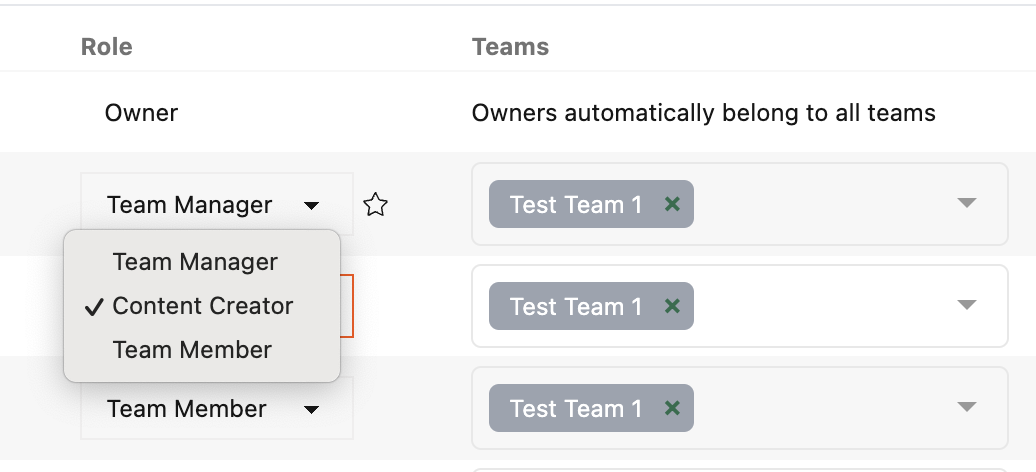
AM Pro Teams - Promoting a Team Member to Content Creator
To assign someone as a Content Creator:
Go to Teams > AM Pro Teams > Manage Users.
In the Role column next to the user, click on the arrow next to their Team Member status and select Content Creator.
The user now has Content Creator permissions.
You can read more about the Content Creator and other user roles and permissions here.