
- Getting Started
- Industry Workflows
- Training
- Features
- Effects
-
Plugins
- AG Core
- AstuteBuddy
- Autosaviour
- ColliderScribe
- DirectPrefs
- DynamicSketch
- FindReplace
- InkFlow
- InkQuest
- InkScribe
- MirrorMe
- Phantasm
- Randomino
- Rasterino
- Reform
- Stipplism
- Stylism
-
SubScribe
- Getting Started
- Circle by Points Tool
- Tangent Circle Tool
- Curvature Circle Tool
- Arc by Points Tool
- Tangent Line Tool
- Perpendicular Line Tool
- Connect Tool
- Straighten Tool
- Lock Unlock Tool
- Orient Tool
- Quick Orient Tool
- Orient Transform Tool
- AG Layer Comps Panel
- Art Switcher Panel
- Gradiator Panel
- Gradient Forge Panel
- AG Color Select Tool
- Color Stamp
- Gradient From Art
- Pixels to Vector
- QuickOps
- Texturino
- VectorFirstAid
- VectorScribe
- WidthScribe
- Scripts
- FAQs
- Updates
- Team Licensing
- Reseller Licensing
- Astute Manager
 Delete Unused Panel Items
The Delete Unused Panel Items operation deletes, depending on its settings, unused items in the current document that are contained in one or more of the following native panels: Brushes, Graphic Styles, Swatches, and Symbols. When all four types of items are enabled, the operation is equivalent to using the default Action with the same name that ships with Illustrator (however, it runs more quickly than an Action).
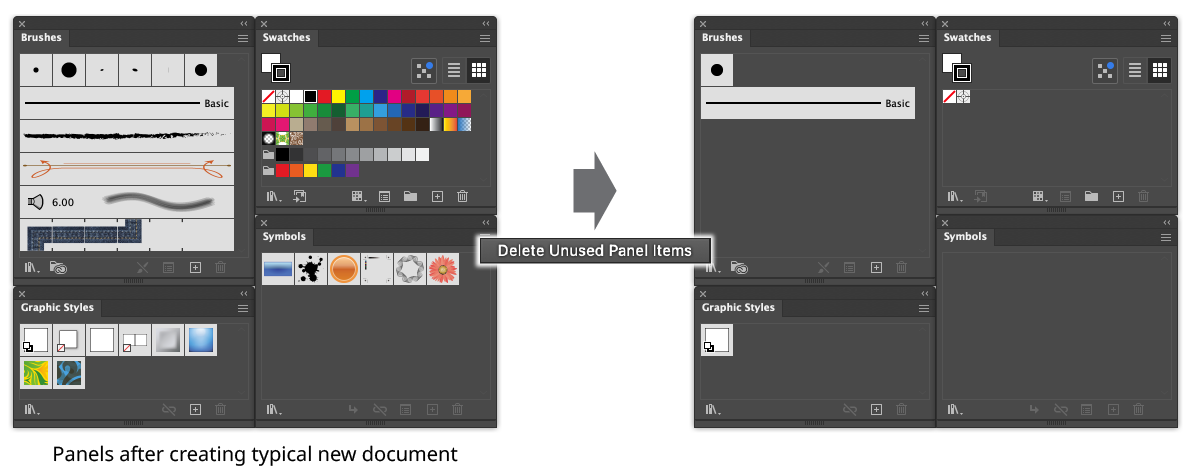
QuickOps Delete Unused Panel Items Example
Holding down Shift when clicking the button can operate on an alternate set of panels, if the settings are so configured. For example, the Swatches panel could be protected, while the Brushes, Graphic Styles, and Symbols panels are still affected.
To configure the settings, click the small icon to the right of the button, which will bring up the settings dialog:
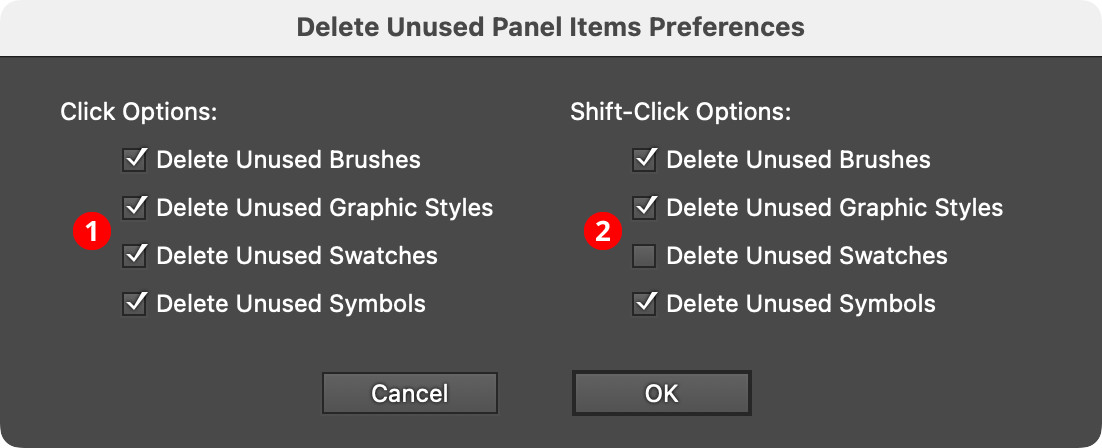
QuickOps Delete Unused Panel Items Preferences
1. Click Options
Specifies which unused items are deleted when the button is clicked with no modifier keys pressed.
2. Shift-Click Options
Specifies which unused items are deleted when the button is clicked with the Shift key pressed.